Hand-building guide
Free printable mug template, in any size
By Slab Marks · Updated October 2026
The short answer: the Slab Marks template maker makes a free printable mug template in any size. Pick Mug, enter the finished size or capacity you want, choose your clay, and print at 100%. You get the wall, the base disc and the handle, already scaled for shrinkage, on Letter or A4 paper.
No sign-up and nothing to download: it runs in your browser. See how it works ↓
Make my template, freeWhat's on the template
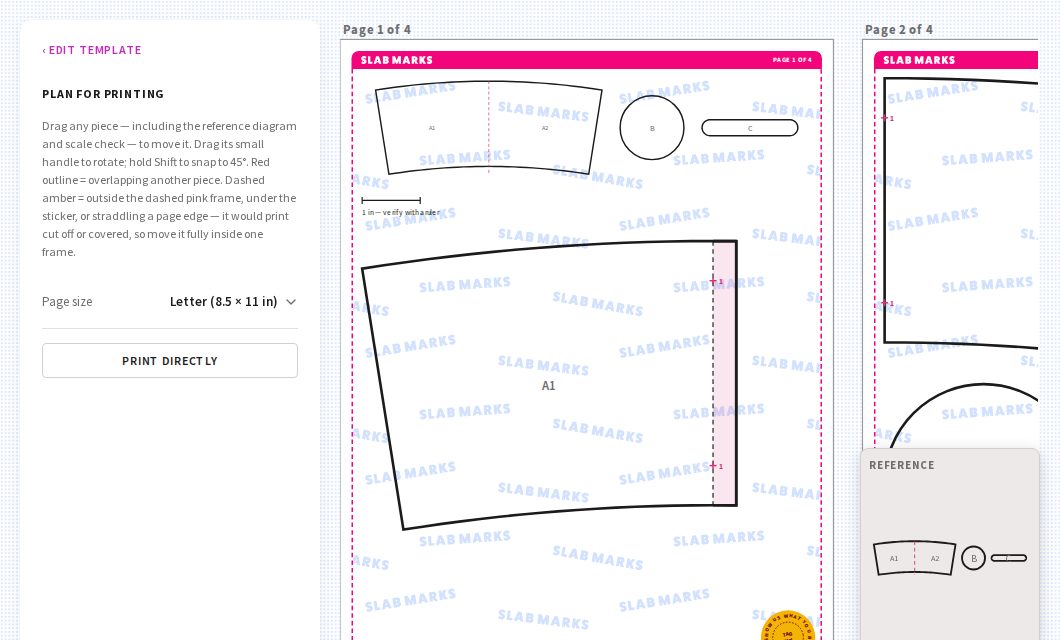
- The wall: a rectangle for a straight mug, or a curved band for a mug that's wider at the top. Labels show the size to cut (wet) and the size you'll get (fired).
- The base disc, sized to the bottom of the mug.
- The handle: a flat strap to cut, or a full-size bending guide to shape it around (round, squared or wedge). See how to make a mug handle from a slab.
- A 1-inch check bar on every printed page, so you can confirm it printed at the right size.
Big walls are split across pages with matching marks, so you can line the pieces up and tape them together. Every page carries the Slab Marks border and page number, so a stack of printouts stays in order.
Popular mug sizes
Straight-sided mugs with 1/4 in walls and base, holding the amount filled to the brim. Cut sizes are for mid-fire stoneware (~12% shrinkage); the template maker works them out for any clay.
| Capacity | Fired W × H (in) | Wall to cut (in) | Base (in) |
|---|---|---|---|
| 8 oz | 2.75 × 3.88 | 9.82 × 4.41 | 3.13 |
| 10 oz | 3 × 3.93 | 10.71 × 4.46 | 3.41 |
| 12 oz | 3.25 × 3.90 | 11.60 × 4.43 | 3.69 |
| 14 oz | 3.25 × 4.50 | 11.60 × 5.12 | 3.69 |
| 16 oz | 3.5 × 4.33 | 12.49 × 4.93 | 3.98 |
Add about 1/2 in to the height if you want room at the top. More on that in how big to cut a slab for a 12 oz mug.
Why size it to your mug and your clay
Every clay shrinks by a different amount, and every potter has a favourite mug shape. A template made for the exact size you want and the clay you use comes out of the kiln the size you planned, and you can make a new one in a minute when you want a taller, wider or bigger mug.
How to print it at the right size
- Click Print template, choose Letter or A4, then Print directly.
- In the print window, set the scale to 100% or Actual size. Never "Fit to page".
- Measure the 1-inch bar with a ruler. If it isn't exactly 1 inch, check the scale setting and print again.
- Tape split pieces together along the matching marks, then cut the template out of card or thin plastic.
Want to keep it? Choose Save as PDF in the print window instead of a printer.
How to do it in Slab Marks
- On the homepage, pick Mug.
- Enter the finished bottom diameter, top diameter and height, or type a Target capacity like 12 oz and the sizes adjust to hold it.
- Open Handle to keep the flat strap or choose a bending guide, and Clay body to pick your clay.
- Click Print template. Drag pieces around if you like, pick Letter or A4, and click Print directly at 100%.
Common questions
Is the mug template really free?
Yes. There's no account, sign-up or payment. Make as many templates as you like.
Can I print it on A4 paper?
Yes. Choose Letter or A4 before printing; the template is split across as many pages as it needs.
Can I sell mugs I make with the template?
Yes, the mugs you make are yours to sell. Please don't sell or share the templates themselves.
What should I cut the template from?
Card stock for a quick test, thin plastic for a template you'll reuse on damp clay. See how to make your own pottery templates.
Be first to know
Join the list for new template forms and easy hand-building project ideas for those "okay… now what?" moments.
No spam, unsubscribe anytime. How I handle your email